Support
The Support page exists for a very specific purpose: helping you collect the right diagnostic information when something in Allsky is genuinely not working as it should.
This is not just another status page, and it is not mainly a place to browse logs manually. Its job is to guide you through creating a support bundle that you can attach to a GitHub discussion or issue so that the Allsky Team has a realistic chance of understanding the problem properly.
That distinction matters. A support request is much more useful when it includes organised evidence rather than a vague description of symptoms. The Support page is designed to help you move from:
- “something seems wrong”
to:
- “here is a structured bundle of information collected from the system at the time of the problem”.
Use GitHub For Support
The Allsky Team does not actively monitor Facebook for troubleshooting and support requests. If you want useful technical help, report problems and ask questions on GitHub.
Use The Right GitHub Path
Use the support workflow on this page when something is genuinely broken or behaving incorrectly.
If your situation is not actually a fault, use one of the GitHub discussion routes below instead:
- If you have a question, create a new GitHub Q&A Discussion.
- If you want to request a new feature, create a new GitHub feature request.
- If you have something else that is not a problem, create a general GitHub Discussion.
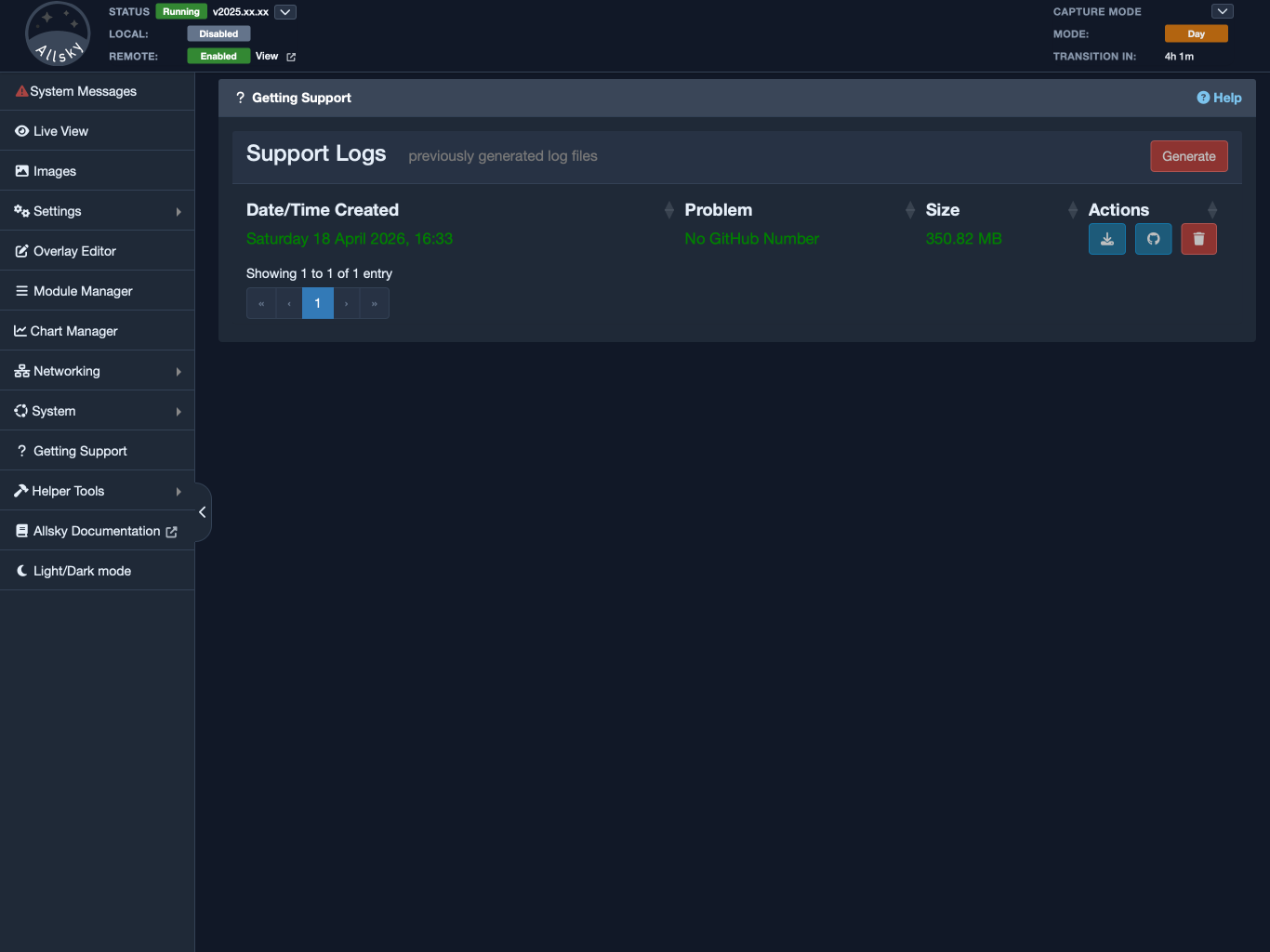
Support page overview
Security And Privacy Matter Here
The Support page deserves to be treated with a little more care than an ordinary status screen, because it creates a diagnostic archive that you may later upload to GitHub.
That archive is valuable precisely because it contains technical detail. It is meant to help diagnose a real problem, which means it gathers a broad snapshot of the system rather than a single small log file. From a troubleshooting point of view, that is a strength. From a privacy and security point of view, it is something you should take seriously.
In practical terms, you should think of a support bundle as a controlled diagnostic package, not as a harmless throwaway file.
That does not mean the feature is unsafe. It does mean you should understand what it is doing and make a deliberate decision before uploading the result anywhere public.
Why The Bundle Needs Broad Information
Many real Allsky problems cannot be diagnosed from one log file alone. A developer may need to understand the wider context:
- which version of Allsky is installed,
- what hardware is attached,
- what the configuration looks like,
- what packages are installed,
- what the web server reported,
- what processes were running,
- what the system state looked like at the time.
That is why the support archive gathers more than just one or two text files. The breadth of information is intentional. It increases the chance that the real cause of the problem can be found without a long back-and-forth of repeated questions.
What Allsky Does To Reduce Risk
The support collection process is not designed as a raw dump of everything on the machine.
The documentation and confirmation dialog make clear that the bundle is intended to avoid obvious personal information wherever practical. In particular, Allsky notes that:
- IPv4 information is obfuscated,
- IPv6 information is obfuscated,
- MAC address information is obfuscated,
- personal information is not intentionally collected.
This is important and worth taking seriously. The support process is designed with privacy in mind, not as an afterthought.
However, “not intentionally collected” does not mean “guaranteed to contain nothing sensitive in every possible installation”. Real systems vary. Users add custom scripts, extra services, site-specific configuration, unusual paths, and third-party integrations. Because of that, you should still approach the archive as something that may contain operationally useful detail about your system.
What You Should Assume Before Uploading
Before uploading a support bundle to GitHub, it is sensible to assume that the archive may include information that is technically useful but still not something you would want to publish casually.
For example, even when obvious secrets are obfuscated, a bundle may still reveal things such as:
- what software is installed,
- what services are present,
- what hardware is attached,
- how the system is structured,
- what files and directories are in use,
- what custom integrations you have added,
- what recent error messages occurred.
That kind of information is often exactly what makes troubleshooting possible. It is also why you should not treat the file as if it were equivalent to an ordinary screenshot.
The right mindset is straightforward: generate the bundle because it is useful, but upload it because you have consciously decided that sharing it is appropriate for the support case.
Why This Page Matters
When people ask for help, the biggest obstacle is often not lack of goodwill. It is lack of useful information. A short description such as “it stopped working” may be completely accurate from the user’s point of view, but it usually does not give enough detail for anyone else to diagnose the problem confidently.
The Support page exists to solve that problem in a structured way.
Instead of expecting you to guess which files matter, manually gather logs, remember which configuration files may be relevant, and then attach a random collection of items to a GitHub post, the page automates the process. It creates a single support bundle that is designed to contain the kind of information that is usually needed for real troubleshooting.
That makes the page useful for both sides:
- it helps you avoid missing important diagnostic information,
- it helps the Allsky Team receive support requests in a more consistent and workable form.
When To Use This Page
The Support page should be used when you are dealing with an actual Allsky problem.
That generally means something is:
- failing,
- behaving incorrectly,
- producing unexpected results,
- or otherwise not working the way it should.
This page is not the right tool for every kind of interaction. If you simply have a question about how something works, want general advice, or want to suggest a new feature, you should not automatically jump to generating a support bundle.
The page itself tries to make this distinction clear, because sending people to the right place from the beginning saves time and confusion later.
As a rough guide:
- use GitHub Q&A Discussions for questions,
- use GitHub Feature Request Discussions for new ideas,
- use ordinary GitHub Discussions for general conversation,
- use the Support page workflow when you are reporting a real problem.
One practical point is worth stating clearly: the Allsky Team does not actively monitor Facebook for support. If you want useful technical help, GitHub is the correct destination.
What The Support Page Does
The Support page manages support bundles.
In everyday use, that means it lets you:
- generate a new support bundle,
- see the bundles that already exist on the system,
- download a bundle so you can attach it to GitHub,
- link a bundle to a GitHub discussion or issue number,
- delete bundles you no longer need.
This makes the page more than a one-time tool. It is a small workflow manager for problem reporting. You may use it once for a single issue, or several times while working through a longer troubleshooting process.
What The Generated Support Bundle Contains
Before the bundle is created, the Support page shows a confirmation message explaining what kind of information will be collected. The exact wording may evolve over time, but the overall purpose is stable: gather useful technical information while avoiding obviously sensitive personal details wherever practical.
The generated support bundle typically includes information such as:
- basic system information,
- filesystem, memory, and network information,
- installed system and Python packages,
- Allsky logs and web server logs,
- connected camera information,
- I2C bus details,
- running process information,
- Allsky configuration files, with sensitive values obfuscated where appropriate.
The page also notes that IPv4, IPv6, and MAC information is obfuscated, and that personal information is not intentionally collected. That is reassuring and important. Even so, this is still a diagnostic archive, so you should continue to think critically about where you upload it and who will be able to access it.
If you are using a public GitHub discussion or issue, remember that the attachment is there to help solve the problem, but it may also be visible to others depending on the repository and discussion context. Treat the archive with the same care you would use for any technical support package that reflects the state of your system.
This is one of the strongest reasons to use the Support page rather than trying to assemble files manually. Consistency matters. If every support request contains a different mixture of logs and settings, troubleshooting becomes slower and more error-prone. A standard bundle gives everyone a much better starting point.
Generating A Support Bundle
The lower part of the page contains the Support Logs panel. This is where support bundles are listed and where new ones are created.
The main action here is the Generate button.
When you click Generate, the page does not immediately begin collecting data without warning. First it shows a confirmation dialog explaining what will be gathered. This gives you a chance to review what is happening and cancel if you are not ready.
If you continue, the page displays a loading overlay while Allsky runs the support collection process and creates a new archive. When it finishes, the table refreshes and the new support bundle appears in the list.
This is useful because the page treats support logs as a history, not as a one-time event. You can create more than one bundle over time, which is helpful when:
- you are testing several possible fixes,
- a developer has asked for a fresh bundle,
- the problem changed after you made adjustments,
- you want to capture the system state at different stages of troubleshooting.
Understanding The Support Logs List
Every generated support bundle appears in the table on the Support page.
The table normally shows:
- the filename,
- the date and time it was created,
- the linked GitHub problem number, if one has been recorded,
- the file size,
- action buttons for download, GitHub linking, and deletion.
This table is helpful because it turns support reporting into an organised process rather than a loose pile of files. You can see what has already been generated, which archive went with which GitHub report, and whether a newer bundle exists.
The filenames themselves are structured so Allsky can track the relationship between the local archive and the related GitHub discussion or issue. In normal use, you should not rename these files by hand. If you want to associate a bundle with a GitHub report, use the GitHub action in the page so the metadata stays consistent.
Downloading A Support Bundle
After you generate a bundle, the most common next step is to download it.
The download action retrieves the selected archive from the Raspberry Pi through your browser. This is the file you attach to your GitHub discussion or issue.
In practical terms, the workflow usually looks like this:
- Reproduce the problem if you can.
- Generate a fresh support bundle.
- Download the newest archive.
- Open or prepare your GitHub discussion or issue.
- Attach the downloaded bundle there.
It is usually best to generate the support bundle reasonably close to the time the problem occurred, especially if the issue is reflected in recent logs or current system state. If you wait too long, the bundle may still be useful, but some of the most relevant context may no longer be current.
Linking A Bundle To GitHub
Once you have created a GitHub discussion or issue and attached the support bundle, you can return to the Support page and link the local file to that GitHub report.
When you click the GitHub button for a support bundle, the page asks for:
- the repository,
- the GitHub ID number.
At present, the repository choices are Allsky and Allsky Modules. The GitHub ID is the number at the end of the URL. For example, if the discussion or issue URL ends in /123, then the ID is 123.
This action does not upload anything to GitHub by itself. It simply updates the local support bundle metadata so the Support page can show a meaningful reference to the related GitHub report.
That may sound small, but it is useful later. If you return to the page after several days or weeks, you can quickly see which local archive was attached to which GitHub discussion or issue. That keeps the support history much easier to follow.
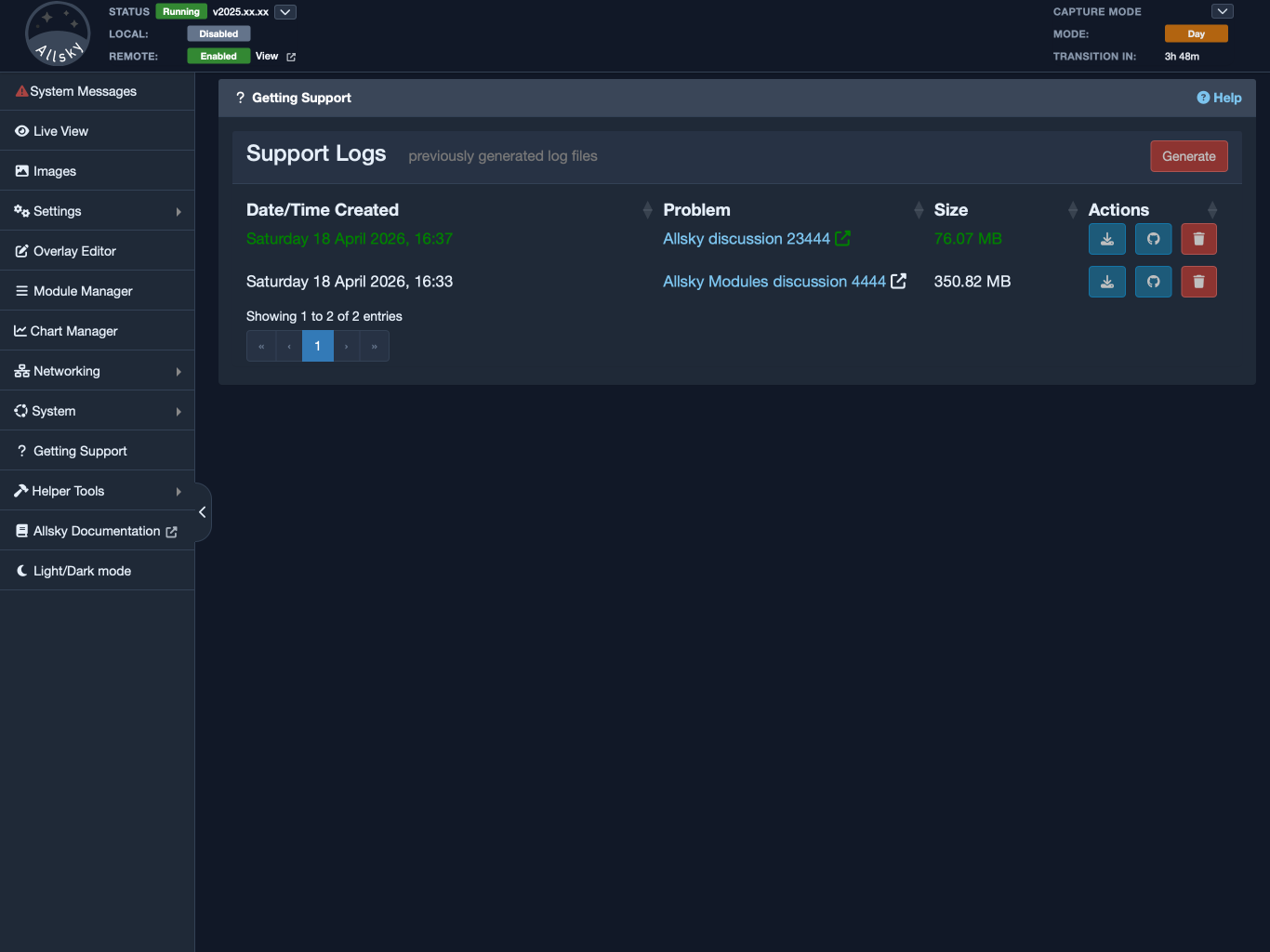
Link GitHub Discussion or Issue dialog
Deleting Old Support Bundles
Each entry in the list also has a delete action. This removes the selected bundle from the Raspberry Pi after confirmation.
Deleting a local support bundle does not remove anything from GitHub. If you already attached the file to a GitHub discussion or issue, that report remains untouched. The delete action only removes the local copy stored by Allsky.
There are several reasonable times to delete an old bundle:
- the issue has been resolved,
- you created a bundle by mistake,
- you generated several bundles while testing and only want to keep the useful ones,
- you simply want to keep the system tidy.
There is no requirement to delete support bundles immediately. Some users prefer to keep them until the issue is fully resolved, which is a perfectly sensible approach.
Typical Support Workflow
Although the page explains the process on screen, it helps to think of the support workflow as a clear sequence.
If you have found a genuine Allsky problem, a sensible workflow is:
- Reproduce the problem if possible.
- Open the Support page in the WebUI.
- Click Generate and confirm the data collection message.
- Wait for the new support bundle to appear in the list.
- Download that bundle.
- Create a GitHub discussion or issue if you have not already done so.
- Attach the support bundle to the GitHub post.
- Submit the post.
- Return to the Support page and record the GitHub discussion or issue number against the local bundle.
That final step is easy to skip, but it is worth doing. Later on, it helps you remember which archive was attached to which report.
Before You Upload A Bundle
Because the support archive is intentionally detailed, it is worth pausing briefly before you upload it.
A sensible checklist is:
- Confirm that you are dealing with a real support problem rather than a general question.
- Generate the bundle as close as practical to the problem event.
- Remember that the archive contains technical system information, not just one log file.
- If your installation includes unusual custom scripts, integrations, or local modifications, keep that in mind when sharing the archive.
- Upload it only to the GitHub discussion or issue that is relevant to the problem.
For most users, that level of caution is enough. The goal is not to create fear around the feature. The goal is to treat the bundle with the seriousness it deserves.
If The Automatic Process Does Not Work
The Support page is the preferred method when the WebUI is working normally. However, there will be times when that is not possible.
For example:
- the WebUI may be unavailable,
- the automatic support generation may fail,
- the system may be in a state where using the normal page is difficult,
- the installation may not be complete enough for the WebUI workflow to be practical.
When that happens, the right response is not to give up on collecting support information. Instead, switch to the manual reporting method described in the troubleshooting guide.
In practical terms, that manual route is appropriate when:
- the Support page cannot complete the bundle generation process,
- the WebUI is unavailable or unreliable,
- you need to gather the support information directly from the command line.
If you can still reproduce the problem, a sensible manual process is:
- Prepare Allsky to collect the most useful diagnostic information by running:
allsky-config prepare_logs
- If that command reports that it changed the Debug Level, make a note of the original setting so you can restore it later.
- Reproduce the problem again if possible.
- Generate the support bundle manually by running:
cd ~/allsky
./support.sh
- This creates a support file in
~/allsky/html/support. - Create a GitHub discussion or issue and attach the generated support file.
- If you saw errors on screen, attach screenshots or paste the text into the GitHub post in a fenced block.
- If there are other files that help explain the problem, attach them as files rather than pasting long contents into the post.
One practical detail is worth remembering: GitHub only accepts certain attachment types. If you need to upload a file with an unsupported extension, rename it by appending .txt before uploading it. For example, settings.json can be renamed to settings.json.txt.
Summary
The Support page is the WebUI’s structured problem-reporting tool. Its purpose is not simply to show information, but to help you collect the right information in a repeatable way when something has gone wrong.
Used properly, it makes support requests clearer, more organised, and much more likely to be useful. If you have a real Allsky problem, this page is usually the best starting point for creating the diagnostic bundle you will attach to your GitHub report.